SnagScout
Menu
80/ 100

Minor friction

Signup Friction Score

buttondown.com

November 9, 2026 · First-time visitor, Skeptical developer · Full audit

Snags
5
Clicks to form
1
Form fields
3
Homepage load
0.1 s

Buttondown signup flow teardown. Tested on November 9, 2026 from https://buttondown.com/

5 snags in the Buttondown signup

  1. #1MajorUnclear value propFirst-time visitor · step 2

    Hero relies on a rhetorical question instead of showing core differentiators

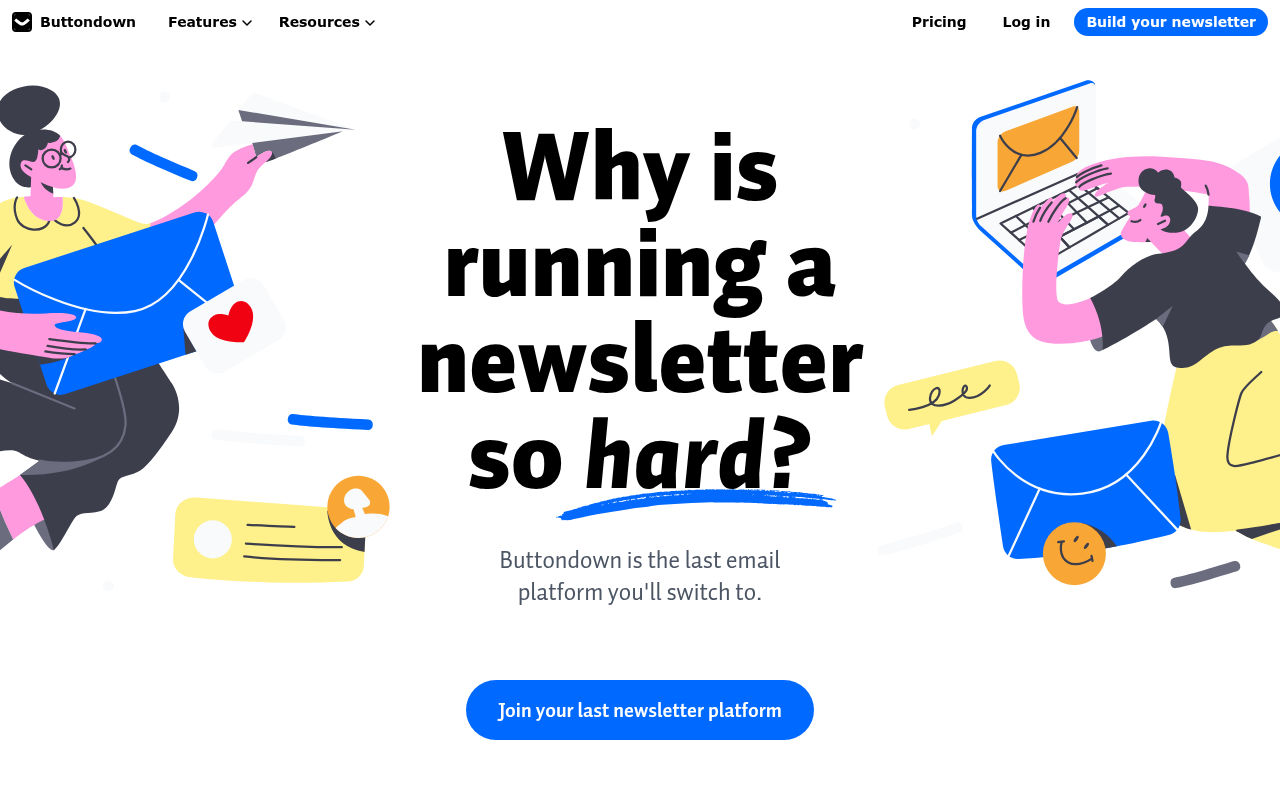
    The headline 'Why is running a newsletter so hard?' and subheadline 'Buttondown is the last email platform you'll switch to' don't tell me what makes it simple or unique in five seconds.

    Fix: Replace 'Buttondown is the last email platform you'll switch to.' with a concrete feature claim like 'Minimalist, markdown-friendly newsletter software with no platform cuts or bloat.'

  2. #2MinorBroken mobile layoutFirst-time visitor · step 2

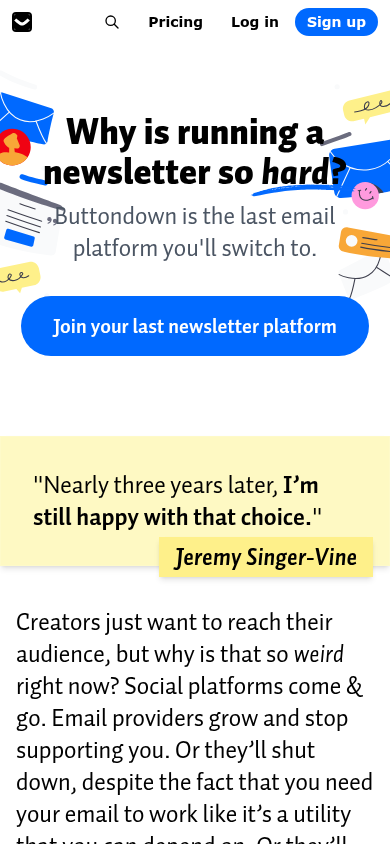
    Mobile hero graphics overlap headline text

    On mobile, decorative envelope and speech-bubble graphics crowd behind and clip into the main headline.

    Fix: Reduce the scale of the background illustration on mobile or move it entirely below the headline.

  3. #3MinorUnclear value propSkeptical developer · step 3

    Hero leads with complaints rather than technical specs

    The headline 'Why is running a newsletter so hard?' is pure emotional copy that tells me nothing about your markdown editor, API, or deliverability stack.

    Fix: Replace 'Buttondown is the last email platform you'll switch to.' with a concrete feature summary like 'A minimalist, Markdown-first newsletter platform with a robust REST API.'

  4. #4MinorJargonSkeptical developer · step 5

    Fluffy CTA button copy

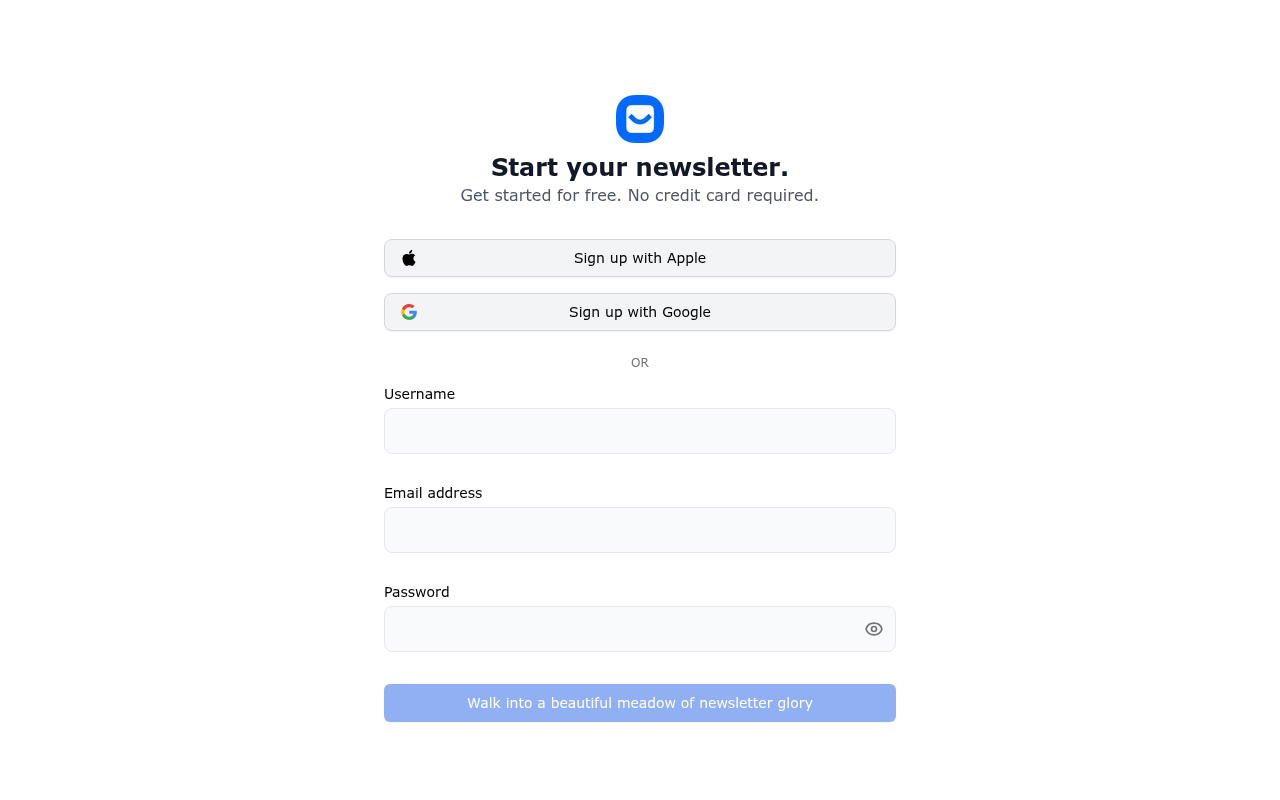
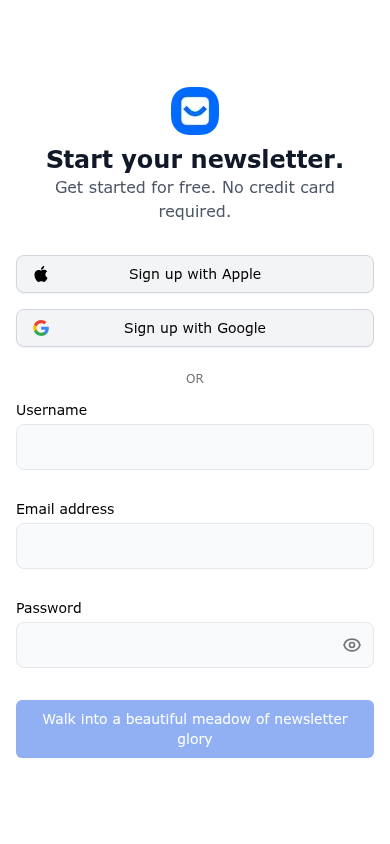
    The submit button text 'Walk into a beautiful meadow of newsletter glory' is overly whimsical and obscures the primary action.

    Fix: Change the CTA button text to clear, direct copy such as 'Create account'.

  5. #5MinorOtherFirst-time visitor · step 5

    Upfront username selection adds friction

    Requiring users to choose an available username right at signup adds unnecessary cognitive load before they even experience the tool.

    Fix: Auto-generate a default username from the email prefix and let users adjust it later during onboarding.

Would your signup beat Buttondown’s 80?

Audit your own signup, free

The 5-second test

Each persona looked at your homepage (desktop and phone) for a moment and answered four questions. Answers are graded against your page’s own copy: clear if it says so above the fold, vague if they had to guess, missing if it is not there.

First-time visitor

clarity 6.3/10

“I immediately get that it is an email newsletter tool, but I have no idea why I should choose it over Substack or Mailchimp without reading a wall of text.”

What does it do? clear
an email newsletter platform
Who is it for? vague
anyone running an email newsletter or content creators
What does it cost? missing
not shown
What’s the next step? clear
Join your last newsletter platform

Skeptical developer

clarity 6.3/10

“It looks like standard creator marketing with tech-bubble illustrations, but I appreciate that there is a direct Pricing link instead of a sales gate.”

What does it do? clear
An email newsletter sending platform
Who is it for? vague
Newsletter authors and content creators, though unspecified in the hero
What does it cost? missing
not shown
What’s the next step? clear
Pricing

Can an AI agent sign up for Buttondown?

A

Agent Signup Readiness

Can an AI agent (ChatGPT agent, Operator and the like) reach your account screen without a human?

  • No bot wall · Pages loaded for an automated browser (pass)
  • Signup form reachable · Found in 1 click(s) (pass)
  • No captcha · No captcha detected on the form (pass)
  • Email signup available · An email or password path exists (pass)
  • No card up front · No card required to start (pass)
  • Not inbox-dependent · Password or link-based signup (pass)
  • Form in page HTML · Form fields are present in the HTML (pass)

Where the points went

How the score is computed
StartEvery run starts at 100100
First-impression clarity6.3/10 average on the 5-second test-9
Path to signup1 click from the homepage to the form0
Form length3 fields before the first gate0
Snags4 distinct snag types-11
Homepage load0.1 s to load the homepage HTML0

The Buttondown signup, step by step

  1. Arrive · All personas · 0.1 s

    Opened buttondown.com

    The homepage HTML arrived in 0.1 s (HTTP 200).

    https://buttondown.com/

    Desktop screenshot at step 1Phone screenshot at step 1
  2. 5-second test · First-time visitor

    5-second test: 6.3/10 clarity

    I immediately get that it is an email newsletter tool, but I have no idea why I should choose it over Substack or Mailchimp without reading a wall of text.

    https://buttondown.com/

  3. 5-second test · Skeptical developer

    5-second test: 6.3/10 clarity

    It looks like standard creator marketing with tech-bubble illustrations, but I appreciate that there is a direct Pricing link instead of a sales gate.

    https://buttondown.com/

  4. Navigate · First-time visitor · 0.2 s

    Clicked “Build your newsletterSign up”

    I can see a clear 'Sign up' link in the header, so I’ll follow it to create an account.

    https://buttondown.com/register

    Desktop screenshot at step 4
  5. Signup form · First-time visitor · 0.1 s

    Reached the signup form: 3 fields, Apple/Google sign-in

    First-time visitor: It is super clear that I can try it for free without a credit card, though having to pick a username right away makes me pause. Skeptical developer: I appreciate standard password registration alongside OAuth with no payment wall, but the cutesy button copy feels a bit precious.

    https://buttondown.com/register

    What the persona would type (test identity, never submitted)

    UsernameAvery Testwell
    Email addressavery.testwell@example.com
    Password••••••••••••
    Desktop screenshot at step 5Phone screenshot at step 5
  6. Stop · First-time visitor

    Stopped before submitting (next gate: email verification)

    SnagScout never types into your live form or presses submit, so no test accounts or leads end up in anyone’s system. The table above shows what the persona would have typed.

    https://buttondown.com/register

FAQ

How many steps does it take to sign up for Buttondown?

Our AI visitor reached the Buttondown signup form in 1 click from the homepage. The form showed 3 fields before the first gate (next: email verification).

Does Buttondown require a credit card to sign up?

No card was requested on the signup form in our run.

Can you sign up for Buttondown with email, or only with Google/SSO?

An email path was available, alongside Apple, Google sign-in.

Can an AI agent sign up for Buttondown?

Buttondown gets an Agent Signup Readiness grade of A. No blockers were found for an autonomous agent.

Are you from Buttondown? We only test public pages and never submit forms. You can ask us to remove this teardown.