SnagScout
Menu
72/ 100

Minor friction

Signup Friction Score

mailchimp.com

November 9, 2026 · First-time visitor, Skeptical developer · Full audit

Snags
7
Clicks to form
1
Form fields
3
Homepage load
0.6 s

Mailchimp signup flow teardown. Tested on November 9, 2026 from https://mailchimp.com/

7 snags in the Mailchimp signup

  1. #1MajorMissing pricingFirst-time visitor · step 2

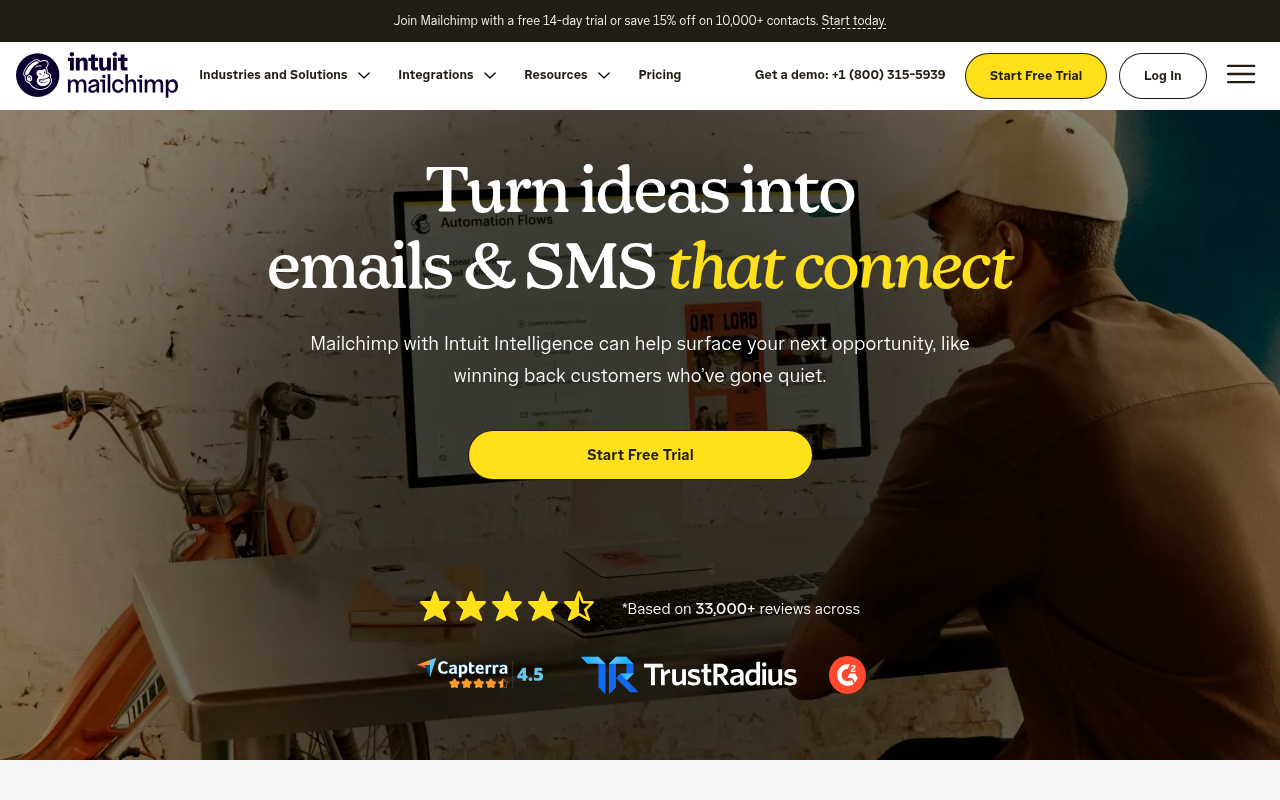
    Base pricing missing above fold

    The banner mentions a 'free 14-day trial or save 15% off on 10,000+ contacts', but no dollar figures or plan tiers are visible before clicking.

    Fix: Add starting price context beneath the main CTA button, such as 'Plans start at $X/mo after free trial'.

  2. #2MajorJargonSkeptical developer · step 3

    Vague AI buzzword in subhead

    The subhead relies on 'Intuit Intelligence' rather than explaining the actual feature or automation logic.

    Fix: Replace 'Mailchimp with Intuit Intelligence can help surface your next opportunity' with concrete features like automated customer journey triggers.

  3. #3MajorMissing pricingSkeptical developer · step 3

    Pricing tiers not visible above the fold

    The banner mentions a '14-day trial' and discounts on '10,000+ contacts', but specific tier costs and permanent free plan details are missing.

    Fix: State starting plan costs and permanent free tier limits directly beside the 'Start Free Trial' button.

  4. #4MajorOtherFirst-time visitor · step 5

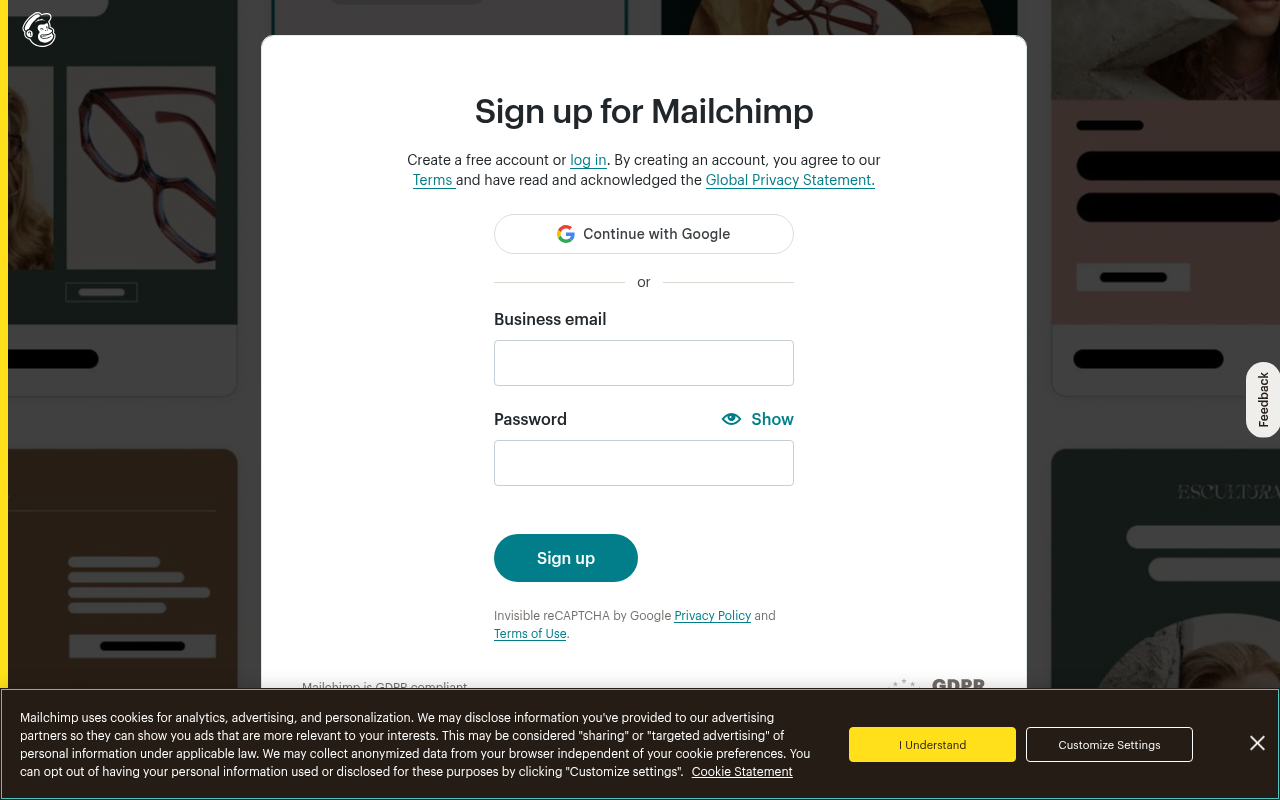
    Intrusive cookie banner obscures desktop view

    On desktop, a high-contrast cookie consent banner consumes the bottom third of the viewport, pushing key compliance disclosures out of sight.

    Fix: Use a less intrusive banner or floating pill at the bottom edge so the signup card remains fully readable.

  5. #5MajorCaptcha wallAll personas · step 5

    Captcha on the signup form

    A captcha script or widget guards the form.

    Fix: Use invisible risk scoring and only show a challenge to suspicious traffic.

  6. #6MinorJargonFirst-time visitor · step 2

    Branded AI buzzword in subhead

    The subheader relies on 'Intuit Intelligence' to describe capability, which feels like corporate jargon rather than a tangible feature.

    Fix: Change 'Mailchimp with Intuit Intelligence can help surface' to 'Mailchimp uses smart automation to help surface'.

  7. #7MinorToo many fieldsSkeptical developer · step 5

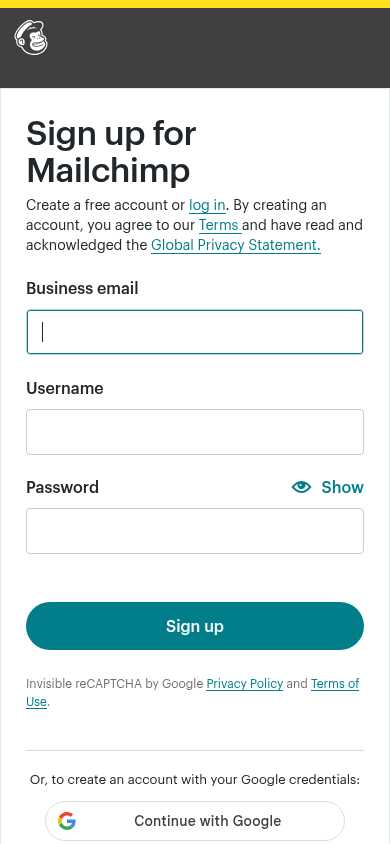
    Inconsistent and redundant username field on mobile

    The mobile view displays a separate 'Username' input, whereas desktop relies solely on email and password. Asking for a username in addition to an email creates friction.

    Fix: Default to using the email address as the unique identifier across all viewports and drop the separate username input.

Would your signup beat Mailchimp’s 72?

Audit your own signup, free

The 5-second test

Each persona looked at your homepage (desktop and phone) for a moment and answered four questions. Answers are graded against your page’s own copy: clear if it says so above the fold, vague if they had to guess, missing if it is not there.

First-time visitor

clarity 7.5/10

“It is clearly an email and SMS tool, but without base pricing visible I do not know if it fits an early-stage startup budget.”

What does it do? clear
An email and SMS marketing platform that automates messaging to help re-engage and win back customers.
Who is it for? vague
Businesses communicating with customers via email and text, though the hero does not specify company size or stage.
What does it cost? vague
Free 14-day trial mentioned in the banner, but actual plan pricing is not shown.
What’s the next step? clear
Start Free Trial

Skeptical developer

clarity 7.5/10

“Standard corporate marketing pitch heavy on buzzwords like 'Intuit Intelligence' and devoid of technical details or API docs.”

What does it do? clear
Email and SMS marketing automation platform.
Who is it for? vague
Marketers and commercial businesses looking to re-engage customers.
What does it cost? vague
Free 14-day trial mentioned, but baseline pricing and tier limits are not shown.
What’s the next step? clear
'Pricing'

Can an AI agent sign up for Mailchimp?

C

Agent Signup Readiness

Can an AI agent (ChatGPT agent, Operator and the like) reach your account screen without a human?

  • No bot wall · Pages loaded for an automated browser (pass)
  • Signup form reachable · Found in 1 click(s) (pass)
  • No captcha · A captcha guards the form; agents are expected to stop there (fail)
  • Email signup available · An email or password path exists (pass)
  • No card up front · No card required to start (pass)
  • Not inbox-dependent · Password or link-based signup (pass)
  • Form in page HTML · Form fields are present in the HTML (pass)

Where the points went

How the score is computed
StartEvery run starts at 100100
First-impression clarity7.5/10 average on the 5-second test-6
Path to signup1 click from the homepage to the form0
Form length3 fields before the first gate0
Snags5 distinct snag types-22
Homepage load0.6 s to load the homepage HTML0

The Mailchimp signup, step by step

  1. Arrive · All personas · 0.6 s

    Opened mailchimp.com

    The homepage HTML arrived in 0.6 s (HTTP 200).

    https://mailchimp.com/

    Desktop screenshot at step 1Phone screenshot at step 1
  2. 5-second test · First-time visitor

    5-second test: 7.5/10 clarity

    It is clearly an email and SMS tool, but without base pricing visible I do not know if it fits an early-stage startup budget.

    https://mailchimp.com/

  3. 5-second test · Skeptical developer

    5-second test: 7.5/10 clarity

    Standard corporate marketing pitch heavy on buzzwords like 'Intuit Intelligence' and devoid of technical details or API docs.

    https://mailchimp.com/

  4. Navigate · First-time visitor · 0.3 s

    Clicked “Start today.”

    I see a clear 'Start today' link offering a free 14-day trial, so I’d click it to create an account.

    https://login.mailchimp.com/signup/

    Desktop screenshot at step 4
  5. Signup form · First-time visitor · 0.2 s

    Reached the signup form: 3 fields, Google sign-in

    First-time visitor: The form looks super clean and the one-click Google button lets me dive straight in without hassle. Skeptical developer: No credit card required upfront is great, but asking for a separate username on mobile feels like an artifact from 2008.

    https://login.mailchimp.com/signup/

    What the persona would type (test identity, never submitted)

    Business emailavery.testwell@example.com
    UsernameAvery Testwell
    Password••••••••••••
    Desktop screenshot at step 5Phone screenshot at step 5
  6. Stop · First-time visitor

    Stopped before submitting (next gate: email verification)

    SnagScout never types into your live form or presses submit, so no test accounts or leads end up in anyone’s system. The table above shows what the persona would have typed.

    https://login.mailchimp.com/signup/

FAQ

How many steps does it take to sign up for Mailchimp?

Our AI visitor reached the Mailchimp signup form in 1 click from the homepage. The form showed 3 fields before the first gate (next: email verification).

Does Mailchimp require a credit card to sign up?

No card was requested on the signup form in our run.

Can you sign up for Mailchimp with email, or only with Google/SSO?

An email path was available, alongside Google sign-in.

Can an AI agent sign up for Mailchimp?

Mailchimp gets an Agent Signup Readiness grade of C. A captcha guards the form; agents are expected to stop there

Are you from Mailchimp? We only test public pages and never submit forms. You can ask us to remove this teardown.