SnagScout
Menu
70/ 100

Minor friction

Signup Friction Score

stripe.com

November 9, 2026 · First-time visitor, Skeptical developer · Full audit

Snags
7
Clicks to form
1
Form fields
4
Homepage load
0.1 s

Stripe signup flow teardown. Tested on November 9, 2026 from https://stripe.com/

7 snags in the Stripe signup

  1. #1MajorMissing pricingFirst-time visitor · step 2

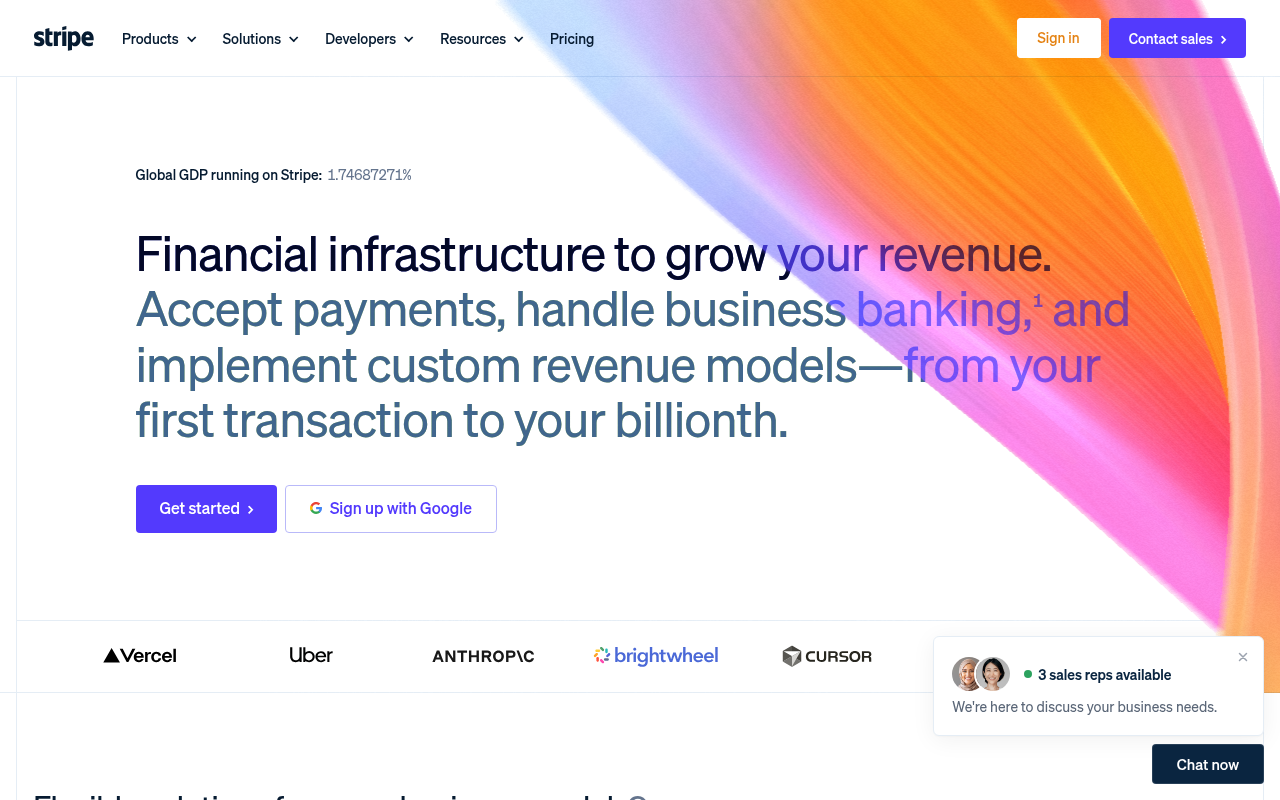
    No pricing visible above the fold

    As a founder checking this out quickly, there is no mention of rates or transaction fees in the hero section.

    Fix: Add a small line of copy near the CTA buttons indicating standard pay-as-you-go rates or linking directly to fee details.

  2. #2MajorUnclear value propSkeptical developer · step 3

    Mobile hero drops the explanatory subhead

    On mobile, the subheadline 'Accept payments, handle business banking, and implement custom revenue models' disappears completely, leaving only the abstract tagline.

    Fix: Keep the descriptive copy 'Accept payments, handle business banking...' below 'Financial infrastructure to grow your revenue.' on mobile screens.

  3. #3MajorCaptcha wallAll personas · step 5

    Captcha on the signup form

    A captcha script or widget guards the form.

    Fix: Use invisible risk scoring and only show a challenge to suspicious traffic.

  4. #4MinorUnclear value propFirst-time visitor · step 2

    Mobile view drops concrete subhead

    On mobile, the subhead 'Accept payments, handle business banking... from your first transaction to your billionth' is cut out above the fold, leaving only the generic 'Financial infrastructure to grow your revenue.' headline.

    Fix: Retain a brief one-line subhead on mobile like 'Accept payments and manage billing from your first transaction' above the primary buttons.

  5. #5MinorSales gateSkeptical developer · step 3

    Sales rep widget clutters the interface

    A sticky modal showing '3 sales reps available' and 'Chat now' sits in the bottom right, which feels pushy for a self-serve platform.

    Fix: Remove the proactive sales popup entirely and leave support/sales in the header navigation.

  6. #6MinorJargonSkeptical developer · step 3

    Vague buzzwords in feature cards

    Sections like 'Monetize through agentic commerce' and 'economic infrastructure for AI' rely on trending marketing jargon instead of concrete technical capabilities.

    Fix: Replace 'Monetize through agentic commerce' with specific functionality such as 'API tools for autonomous agent payments'.

  7. #7MinorOtherSkeptical developer · step 5

    No direct link to documentation or API reference

    Users arriving directly at the register endpoint cannot see quick links to docs, pricing, or test mode guides before creating an account.

    Fix: Add discreet header or footer links to documentation and pricing alongside the privacy and terms links.

Would your signup beat Stripe’s 70?

Audit your own signup, free

The 5-second test

Each persona looked at your homepage (desktop and phone) for a moment and answered four questions. Answers are graded against your page’s own copy: clear if it says so above the fold, vague if they had to guess, missing if it is not there.

First-time visitor

clarity 7.5/10

“Looks incredibly polished and authoritative, though I would like to see baseline transaction pricing right away without clicking around.”

What does it do? clear
Financial infrastructure to accept payments, handle business banking, and run billing models.
Who is it for? clear
Businesses of any scale, from early-stage startups processing their first transaction to global enterprises.
What does it cost? missing
not shown
What’s the next step? clear
Get started

Skeptical developer

clarity 7.5/10

“Slick presentation with obvious developer roots, but it is increasingly diluted by AI marketing buzzwords and unprompted sales chat widgets.”

What does it do? clear
Payment processing, subscription billing, and developer-oriented financial APIs.
Who is it for? clear
Internet businesses and software platforms, from solo founders to large enterprises.
What does it cost? missing
not shown
What’s the next step? clear
'Developers'

Can an AI agent sign up for Stripe?

C

Agent Signup Readiness

Can an AI agent (ChatGPT agent, Operator and the like) reach your account screen without a human?

  • No bot wall · Pages loaded for an automated browser (pass)
  • Signup form reachable · Found in 1 click(s) (pass)
  • No captcha · A captcha guards the form; agents are expected to stop there (fail)
  • Email signup available · An email or password path exists (pass)
  • No card up front · No card required to start (pass)
  • Not inbox-dependent · Password or link-based signup (pass)
  • Form in page HTML · The form only appears after JavaScript runs (fail)

Where the points went

How the score is computed
StartEvery run starts at 100100
First-impression clarity7.5/10 average on the 5-second test-6
Path to signup1 click from the homepage to the form0
Form length4 fields before the first gate-3
Snags6 distinct snag types-21
Homepage load0.1 s to load the homepage HTML0

The Stripe signup, step by step

  1. Arrive · All personas · 0.1 s

    Opened stripe.com

    The homepage HTML arrived in 0.1 s (HTTP 200).

    https://stripe.com/

    Desktop screenshot at step 1Phone screenshot at step 1
  2. 5-second test · First-time visitor

    5-second test: 7.5/10 clarity

    Looks incredibly polished and authoritative, though I would like to see baseline transaction pricing right away without clicking around.

    https://stripe.com/

  3. 5-second test · Skeptical developer

    5-second test: 7.5/10 clarity

    Slick presentation with obvious developer roots, but it is increasingly diluted by AI marketing buzzwords and unprompted sales chat widgets.

    https://stripe.com/

  4. Navigate · First-time visitor · 0.2 s

    Clicked “Start now”

    I see a clear 'Start now' link that leads to account registration, so I’ll use that to create an account.

    https://dashboard.stripe.com/register

    Desktop screenshot at step 4
  5. Signup form · First-time visitor · 0.2 s

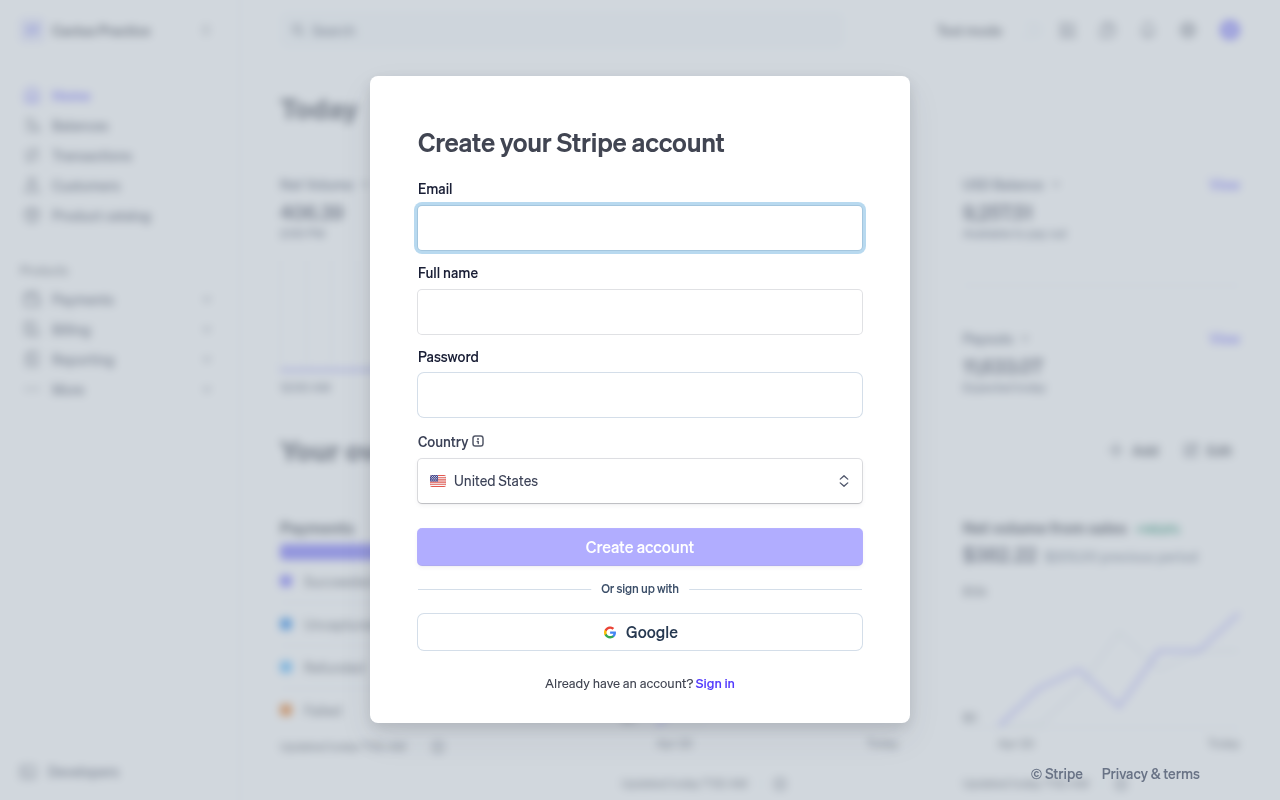
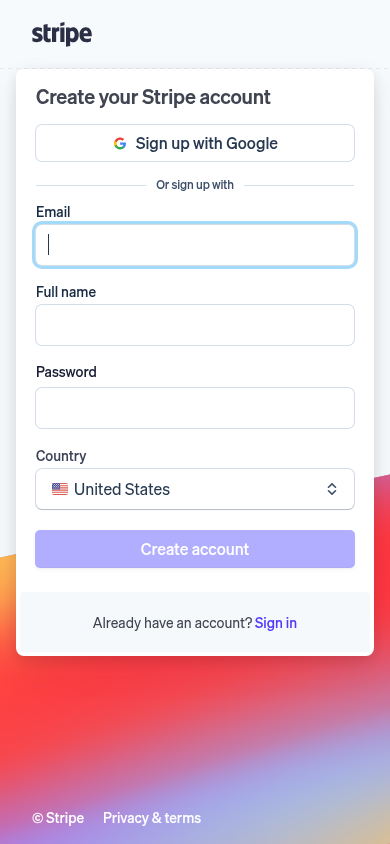
    Reached the signup form: 4 fields, Google sign-in

    First-time visitor: The peek at the actual dashboard in the background makes it immediately clear what I am signing up for, and four quick fields feel completely painless. Skeptical developer: Straightforward signup with standard credentials and no forced sales calls or credit cards, though I wish there were a direct link to the API docs from here.

    https://dashboard.stripe.com/register

    What the persona would type (test identity, never submitted)

    Emailavery.testwell@example.com
    Full nameAvery Testwell
    Password••••••••••••
    Countrytest value
    Desktop screenshot at step 5Phone screenshot at step 5
  6. Stop · First-time visitor

    Stopped before submitting (next gate: email verification)

    SnagScout never types into your live form or presses submit, so no test accounts or leads end up in anyone’s system. The table above shows what the persona would have typed.

    https://dashboard.stripe.com/register

FAQ

How many steps does it take to sign up for Stripe?

Our AI visitor reached the Stripe signup form in 1 click from the homepage. The form showed 4 fields before the first gate (next: email verification).

Does Stripe require a credit card to sign up?

No card was requested on the signup form in our run.

Can you sign up for Stripe with email, or only with Google/SSO?

An email path was available, alongside Google sign-in.

Can an AI agent sign up for Stripe?

Stripe gets an Agent Signup Readiness grade of C. A captcha guards the form; agents are expected to stop there. The form only appears after JavaScript runs

Are you from Stripe? We only test public pages and never submit forms. You can ask us to remove this teardown.